


How the Munch Museum Improved Collections Relocation with TMS Barcode Manager

Who They Are
Barcoding Best Practices When Moving House
In order to accommodate the large collection and the increasing number of visitors, in 2013 the Oslo City Council voted to significantly expand the museum, and a new Munch Museum building is scheduled to open in 2019. The Munch’s sister institution, the Stenersen Museum, which focuses on contemporary art, will share the new building. Moving to a new location is challenging, and the Munch Museum has implemented TMS Barcode Manager to track objects while they are housed in temporary storage.
The Challenge
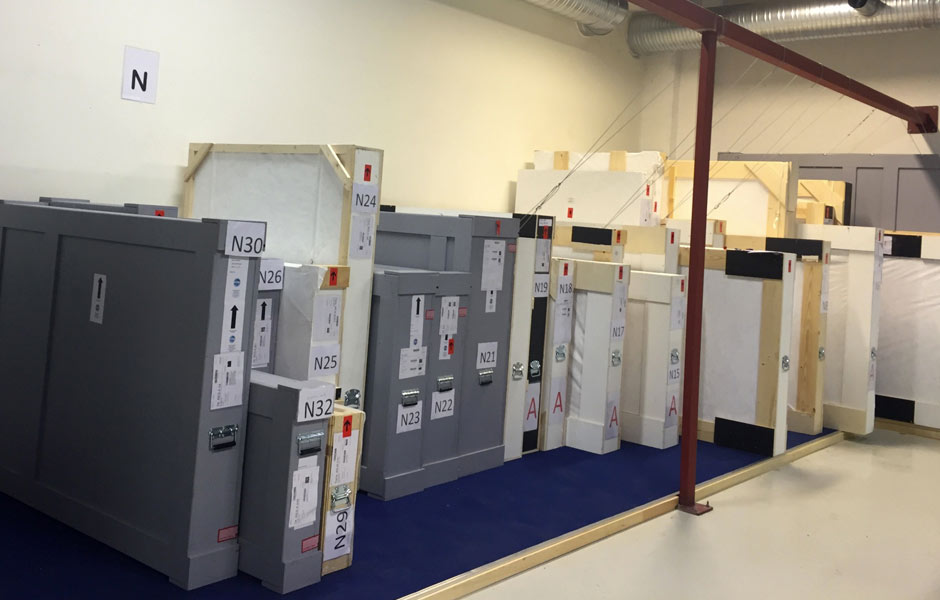
In anticipation for the move to the new facility, three collections from the Stenersen Museum were placed in an external storage facility. According to Hilde Bøe, Digital Collection Manager at the Munch Museum, “Prior to the completion of the new Munch, parts of this collection will be lent to other institutions and displayed in the museum’s own exhibitions. There will be much activity around the collections in their temporary storage.” With so much activity involving both exhibitions and temporary storage facilities, the Munch needed to pay special attention to tracking objects as they moved from place to place.
The Solution
Hilde’s team relies on The Museum System (TMS) to catalogue the vast collection of Edvard Munch’s work and ephemera, and they felt it was a good choice to implement TMS Barcode Manager to track objects in temporary storage. Hilde explains the process: “The scan file is transferred from the scanner to the PC using software from the scanner. This file is then opened in Barcode Manager and the data is reviewed before it is ingested into TMS, which works very smoothly.”
The Outcome
“For years we have wanted to implement barcoding to aid us in moving and handling objects, and with this move the opportunity was finally at hand,” says Hilde. For other institutions interested in implementing a barcoding project, Hilde suggests paying particular attention to the size of the barcode font. “We recommend a barcode size of 16 points for easy scanning. Any smaller and the scanner has trouble reading the code.” She also recommends sufficient spacing between the barcode and other elements such as label text and images, and warns against placing the barcode label too low on the object or crate.
While utilizing the TMS Barcode Manager, the Munch took advantage of custom label reports, which can be tailored to fit the needs of any institution. The Munch formulated their reports to create labels for each layer of packaging:
- A crate list with barcodes for the crate and all objects within;
- An all-crates-list with barcodes for every crate in TMS;
- An all-locations-list with barcodes for every location in TMS;
- An all-objects-list with barcodes for every object in TMS.
These lists proved to be particularly useful when scanning the object or crate wasn’t an option due to its location, and gave the museum the ability to scan the future location of objects. The ability to track future object locations was important to the Munch as their new building is still under construction. However, as Hilde explains, “Scanning a label that is not on the actual object, crate, or location is not recommended, as there will always be a risk of scanning the wrong label. Always check your scanned barcodes in the Barcode Manager before processing the scan.”
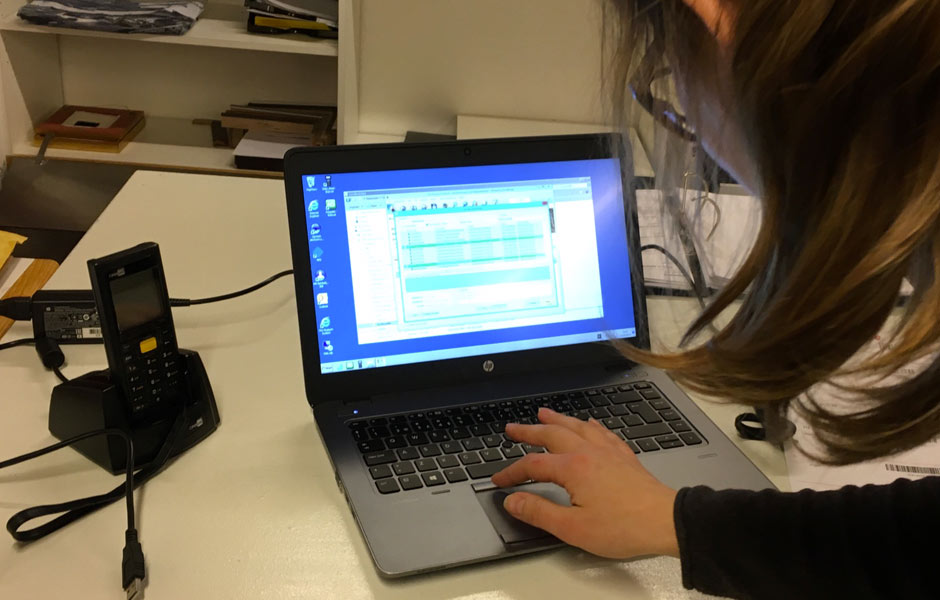
Rather than scanning each object individually while moving to a storage location, Hilde’s team assigned the objects to specific crates. Grouping the objects into crates meant that only the crates and locations needed to be scanned during the move, not the individual objects. “This definitely saved time!” says Hilde.
Barcode Manager is evolving with the input of museums like the Munch, and Hilde indicates “We have learned a lot and achieved a lot, but there are enhanced features and user experience upgrades we would like to see.” Hilde’s feedback provides an invaluable resource for Gallery Systems to gain a deeper understanding of the needs of museums to develop new functionality and tools. Building off of Hilde’s comments and experience helps us to build a better Barcode Manager.
Barcoding allows the Munch to quickly and efficiently access object information and location. The Munch is looking forward to using barcodes for their entire collection. “We want to expand this system and use barcoding as a tool when we move all objects to the new museum,” concludes Hilde.

One Platform for Collections Management,
Conservation, Media, and Publishing

TMS Collections
TMS Media Studio
TMS Conservation Studio
eMuseum
More Success Stories

Why Galleries Can No Longer Wait to Modernize Their Gallery Management Software
The Art World’s Technology Reckoning Only 19% of galleries call themselves technology leaders, yet 43% plan to invest more in online sales this year, according to Artsy’s Art Market…

Collective Conversations with Chad Petrovay
Professional Services Specialist, Gallery Systems With a museum career spanning multiple institutions and over a decade partnering with Gallery Systems clients, Chad brings a rare combination of…

Why Galleries Can No Longer Wait to Modernize Their Gallery Management Software
The Art World’s Technology Reckoning Only 19% of galleries call themselves technology leaders, yet 43% plan to invest more in online sales this year, according to Artsy’s Art Market…
Collective Conversations with Chad Petrovay
Professional Services Specialist, Gallery Systems With a museum career spanning multiple institutions and over a decade partnering with Gallery Systems clients, Chad brings a rare combination of…
Why Galleries Can No Longer Wait to Modernize Their Gallery Management Software
The Art World’s Technology Reckoning Only 19% of galleries call themselves technology leaders, yet 43% plan to invest more in online sales this year, according to Artsy’s Art Market…
Collective Conversations with Chad Petrovay
Professional Services Specialist, Gallery Systems With a museum career spanning multiple institutions and over a decade partnering with Gallery Systems clients, Chad brings a rare combination of…
Why Galleries Can No Longer Wait to Modernize Their Gallery Management Software
The Art World’s Technology Reckoning Only 19% of galleries call themselves technology leaders, yet 43% plan to invest more in online sales this year, according to Artsy’s Art Market…
Collective Conversations with Chad Petrovay
Professional Services Specialist, Gallery Systems With a museum career spanning multiple institutions and over a decade partnering with Gallery Systems clients, Chad brings a rare combination of…
Why Galleries Can No Longer Wait to Modernize Their Gallery Management Software
The Art World’s Technology Reckoning Only 19% of galleries call themselves technology leaders, yet 43% plan to invest more in online sales this year, according to Artsy’s Art Market…
Collective Conversations with Chad Petrovay
Professional Services Specialist, Gallery Systems With a museum career spanning multiple institutions and over a decade partnering with Gallery Systems clients, Chad brings a rare combination of…